> ## Documentation Index
> Fetch the complete documentation index at: https://agents.nanonets.com/docs/llms.txt
> Use this file to discover all available pages before exploring further.
# Rules
> Help your agent improve by turning corrections and instructions into rules it follows next time.
Agents improve when you teach them what your team expects. You do this by creating **rules**.
There are three ways to add a rule:
* **Correct a result**: fix a wrong value or output on a task, and the fix becomes a rule.
* **Give an instruction in the task chat**: tell the agent what to do, and it saves the instruction as a rule.
* **Add a rule yourself**: write one directly in the **Learning** tab.
However a rule is created, it starts as a draft and waits for your approval.
## What a rule can capture
A rule is anything you want the agent to remember and apply next time: a preference, a correction, a format, or a guardrail. For example:
* "Read the invoice date as DD/MM/YYYY for Northwind Traders." (a vendor-specific format)
* "Ask for approval before any payment above \$10,000." (a guardrail for every task)
* "Match invoices from TechSupply Co. to vendor ID 10482." (a lookup to reuse)
* "The customer's PO number is printed near the shipping address." (where to find a field)
## Correct a result
The fastest way to teach the agent is to fix a value on a real result.
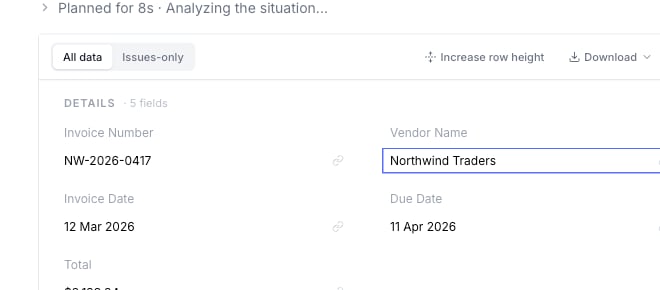 Open a task result and locate the field the agent got wrong.
Change it to what it should have been, and save.
Explain what should happen next time. For example, "Use the due date from the payment terms, not the invoice date."
Good correction notes:
* "Use the due date from the payment terms section, not the invoice date."
* "This vendor should be matched to vendor ID 10482."
* "If the tax field is blank, leave it blank. Do not copy the shipping amount."
If the value belongs to a tag group (like a vendor name), the rule is scoped to that value automatically, so it only applies in that context. See [Tag groups](/docs/guide/tag-groups).
## Give chat instructions
You can also teach the agent by telling it what to do in the task chat. To make sure your instruction becomes a reliable rule, write it as a durable preference, not a one-off ask.
Open a task result and locate the field the agent got wrong.
Change it to what it should have been, and save.
Explain what should happen next time. For example, "Use the due date from the payment terms, not the invoice date."
Good correction notes:
* "Use the due date from the payment terms section, not the invoice date."
* "This vendor should be matched to vendor ID 10482."
* "If the tax field is blank, leave it blank. Do not copy the shipping amount."
If the value belongs to a tag group (like a vendor name), the rule is scoped to that value automatically, so it only applies in that context. See [Tag groups](/docs/guide/tag-groups).
## Give chat instructions
You can also teach the agent by telling it what to do in the task chat. To make sure your instruction becomes a reliable rule, write it as a durable preference, not a one-off ask.
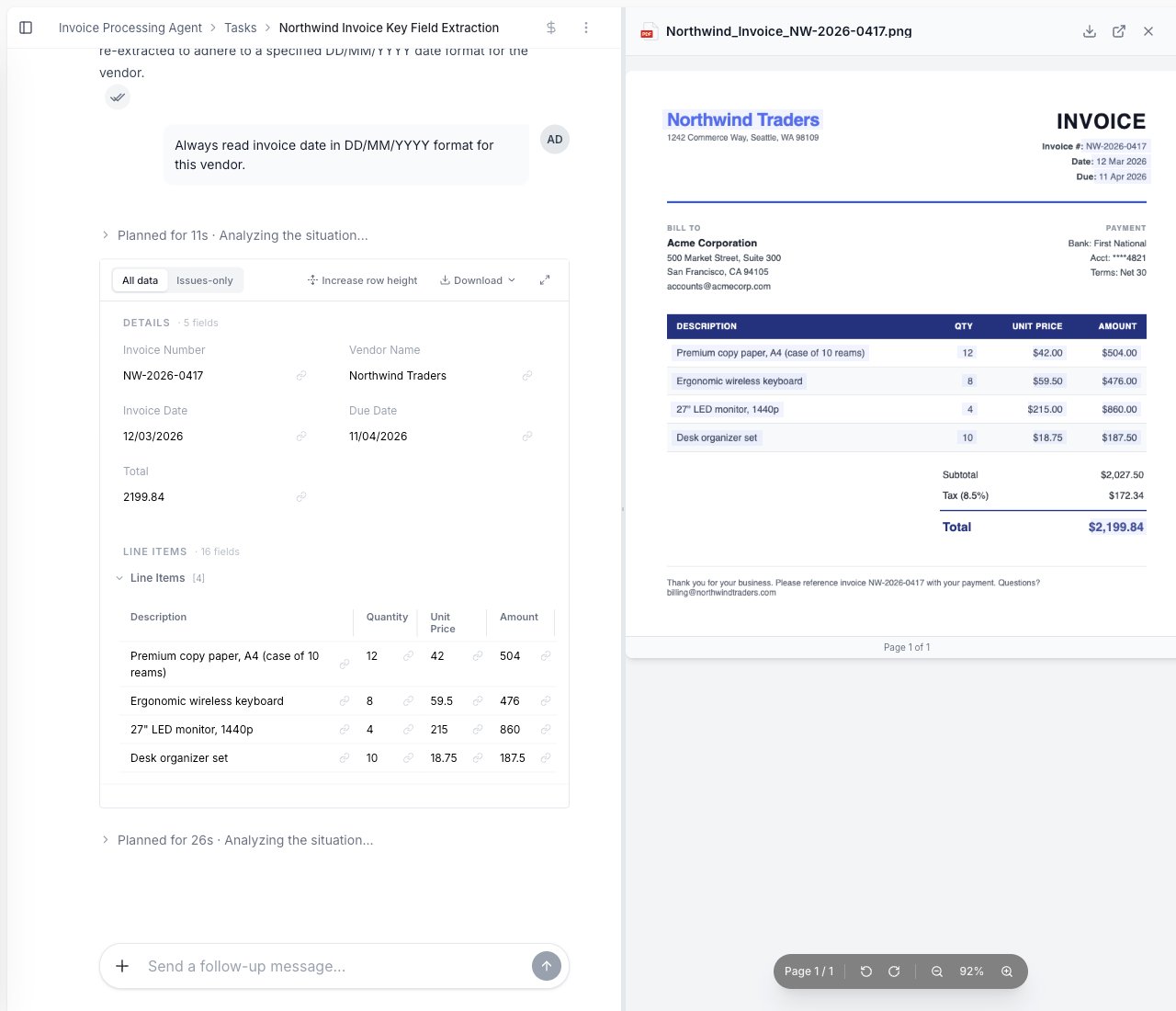 | Less reliable | Becomes a clean rule |
| --------------------------- | ------------------------------------------------------------------------ |
| "Fix the date on this one." | "Whenever you read a Northwind Traders invoice, the date is DD/MM/YYYY." |
| "That vendor is wrong." | "Always match invoices from TechSupply Co. to vendor ID 10482." |
| "Don't do that again." | "Never approve an invoice above \$10,000 without finance approval." |
Tips for instructions that turn into good memory:
* **State the condition and the action.** "When X, do Y" is easier to learn than "do Y".
* **Say what it applies to.** Name the vendor, customer, or document type, or say it applies to all of them.
* **One rule per instruction.** Don't bundle several changes into one message.
* **Use durable words** like *always*, *whenever*, or *for this vendor*, not *this time*.
## Add a rule directly
You can also write a rule yourself, without waiting for a correction.
Go to the agent you want to improve.
Select the **Learning** tab and choose **Add rule**.
Write it in clear business language. Keep it specific, and name what it applies to.
## Keep rules specific
Specific rules are easier for the agent to follow.
| Too broad | Better |
| --------------------------------- | ------------------------------------------------------------------------------------------------- |
| "Handle vendor names better." | "On Northwind Traders invoices, read the vendor name from the letterhead, not the 'Pay to' line." |
| "Ask when things are wrong." | "Ask the user if the invoice total does not match the line items." |
| "Use the right approval process." | "Ask the finance manager before approving invoices above \$10,000." |
## Review and approve rules
However a rule is created (a correction, a chat instruction, or one you write yourself), it starts as a **draft** in the **Learning** tab. Drafts are not used until you approve them.
| Less reliable | Becomes a clean rule |
| --------------------------- | ------------------------------------------------------------------------ |
| "Fix the date on this one." | "Whenever you read a Northwind Traders invoice, the date is DD/MM/YYYY." |
| "That vendor is wrong." | "Always match invoices from TechSupply Co. to vendor ID 10482." |
| "Don't do that again." | "Never approve an invoice above \$10,000 without finance approval." |
Tips for instructions that turn into good memory:
* **State the condition and the action.** "When X, do Y" is easier to learn than "do Y".
* **Say what it applies to.** Name the vendor, customer, or document type, or say it applies to all of them.
* **One rule per instruction.** Don't bundle several changes into one message.
* **Use durable words** like *always*, *whenever*, or *for this vendor*, not *this time*.
## Add a rule directly
You can also write a rule yourself, without waiting for a correction.
Go to the agent you want to improve.
Select the **Learning** tab and choose **Add rule**.
Write it in clear business language. Keep it specific, and name what it applies to.
## Keep rules specific
Specific rules are easier for the agent to follow.
| Too broad | Better |
| --------------------------------- | ------------------------------------------------------------------------------------------------- |
| "Handle vendor names better." | "On Northwind Traders invoices, read the vendor name from the letterhead, not the 'Pay to' line." |
| "Ask when things are wrong." | "Ask the user if the invoice total does not match the line items." |
| "Use the right approval process." | "Ask the finance manager before approving invoices above \$10,000." |
## Review and approve rules
However a rule is created (a correction, a chat instruction, or one you write yourself), it starts as a **draft** in the **Learning** tab. Drafts are not used until you approve them.
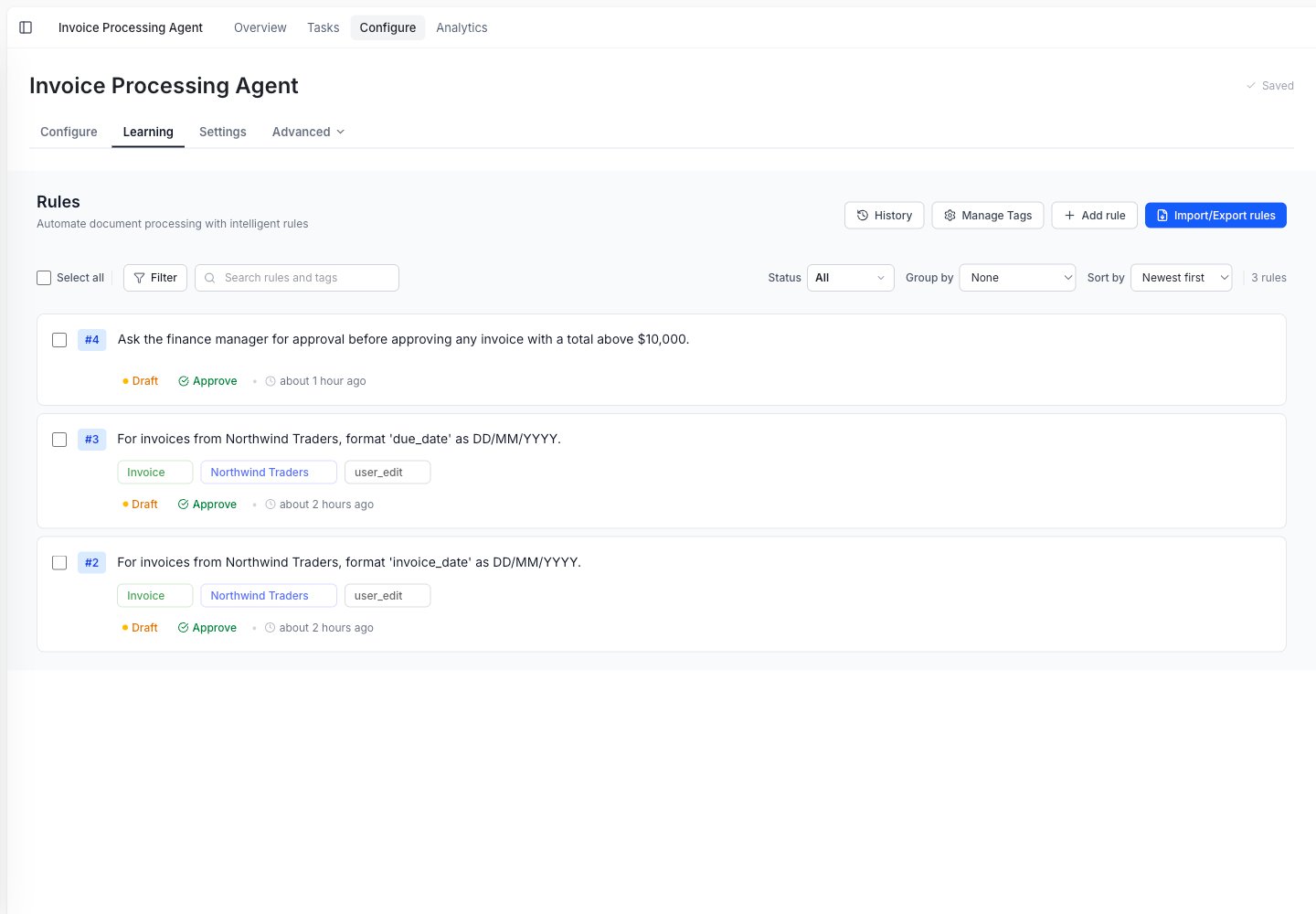
 Review your rules regularly. They can become outdated when:
* Your approval limits change.
* Your team changes how data should be formatted.
* A vendor changes its document layout.
* The agent starts applying an old rule in the wrong place.
A small set of clear rules is better than a long list of vague rules.
Review your rules regularly. They can become outdated when:
* Your approval limits change.
* Your team changes how data should be formatted.
* A vendor changes its document layout.
* The agent starts applying an old rule in the wrong place.
A small set of clear rules is better than a long list of vague rules.