

llm_match, the semantic entity-matching tool exposed through the Agents Platform. It matches free text (a vendor name from an invoice, a PO line-item description) against a catalog synced from a connected system (SAP, NetSuite, Postgres, SQL Server, …) via the internal LLM matching service.
Supported integrations
llm_match can only bind to an integration whose service has a registered match adapter. Today that is:
Binding the tool to any other integration is rejected with
LLM matching not supported for <service>.
Two SQL Server credential fields are mapped when the config is handed to the matching service: trust_server_certificate is sent as trust_cert, and host_name_in_certificate is dropped — the matching service has no counterpart for it. A SQL Server whose certificate only validates via that field may connect from mssql_execute_query but fail to sync here.
Authentication and enablement
Configured tool: requires an integration binding (integration_id), a table (table_name), and the column to match on (embedding_key). Optionally bind unique_key_column — the catalog column holding each product’s unique identity (e.g. KUNNR, MATNR, or a derived concat column built on the data side for composite keys). When bound, it is surfaced on results as unique_key_column, always survives return_columns projection, and downstream review/learnings use it as the correction key. It also becomes that catalog’s sync-time identity for any match config created after it’s set: without it, source rows that share the same embedding_key value collapse into one row during sync, and matches against the lost rows silently return no result. Binding it before the catalog is first synced avoids that; it has no effect on a catalog already synced under an existing config. The bound integration’s catalog is synced into the matching service before the tool becomes usable (status must be ready; a still-syncing config returns a retriable error). Off by default — enable it in the agent’s Tools panel. The prompt itself and the candidate pool are configurable per tool — see Prompt and retrieval tuning.
Inputs
Required (one of):search_text— a single text to match.search_texts— batch mode: multiple texts matched in one call, one result row per text in input order. Prefer this over calling the tool once per line item (N line items stay one step). When set,search_textis ignored.
max_candidates(default 1) — how many close matches to return per input. Set 3–5 when the result feeds a human review step so alternatives render as a dropdown.return_columns— project matched rows (and candidate products) to these columns. Use when catalog rows are wide: an untrimmed batch result can exceed the tool-output cap and truncate. The matched column is always retained.filters— structured$and/$orfilter over catalog attributes, applied to every input (batch included). See Filters.
Filters
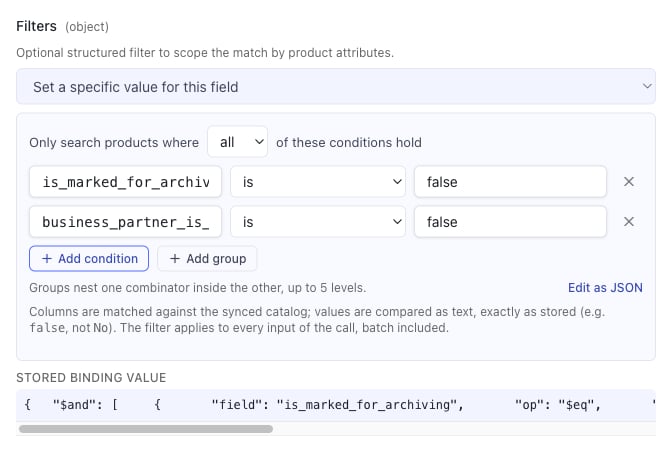
A filter scopes the catalog the matcher searches: the root is a logical operator ($and or $or) whose value is an array of conditions {field, op, value|values}. It applies to every input of the call, batch included, and travels per request — no re-sync.
$and/$or array — which the matching service evaluates recursively, so status = ACTIVE AND (region = EU OR region IN (US, CA)) is expressible:
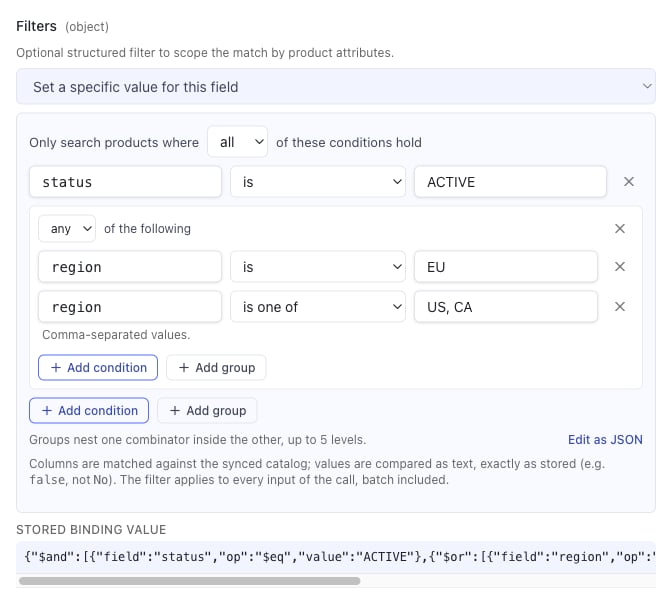
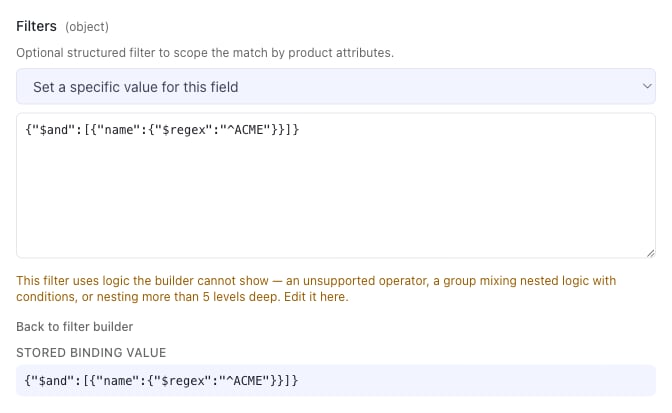
Every comparison runs on
product ->> '<column>', so values match the stored text exactly (false, not No). An invalid filter fails the call fast with a message naming the condition rather than silently matching everything.
Prompt and retrieval tuning (configured tool only)
Seven knobs shape the prompt the matching service sends and the candidate pool it picks from. All are admin-bound (x-exclude-from-llm) — the model can neither read nor set them — and all are optional: leave one blank and the matching service keeps its own default. They travel per request, so a change takes effect on the next call with no re-sync.
The prompt
The service substitutes three placeholders and sends whatever is left:{{searchText}}— the text being matched. Required.{{productList}}— the retrieved candidates, one per line, rendered withproduct_list_template. Required.{{previousMappings}}— learned mappings from past reviewer corrections, rendered withprevious_mappings_template. Optional; omit it to ignore learnings for this tool.
max_candidates > 1); the identifiers are extracted from the reply and anything else is discarded. The assembled prompt is truncated at 300,000 characters by the service.
The row templates
Both take the matching service’sTemplateConfig shape — a fmt format string plus the ordered keys filling its verbs, one rendering per row:
- One verb per key, in order. Use
%sfor text and%vwhere the column may be numeric (JSON numbers rendered with%scome out as%!s(float64=…)).%%is a literal percent. - Resolved key names:
embedding_key(the matched column’s value),database_identifier(the product’s identity),search_textandmatch_type(learned mappings only). - Any other key is read as a catalog column and renders blank when that column is absent — a typo yields empty fields, not an error.
- A verb/key count mismatch is rejected up front; upstream it would silently bake
%!s(MISSING)into every candidate line. - The binding UI stores the JSON editor’s content as a string; both the string and a real object form are accepted.
product_list_template is the usual fix for a match that needs a disambiguator the embedding column doesn’t carry (two vendors with the same name in different cities). Raising similar_products_limit is the fix for the right record existing in the catalog but never reaching the prompt — at the cost of tokens and latency on every match.
num_batches caveat
num_batches is honoured on the single-input (search_text) path only. The matching service accepts it on the async endpoint the search_texts batch path uses, but never persists it on the job row, so a batch call always runs unbatched — the tool logs a warning (num_batches is ignored on batch (search_texts) calls) rather than letting the binding look effective.
use_learned_rules
When on, the tool fetches the agent’s approved learned rules (operation type llm_match — or all approved rules, entity-scoped to the task, when the agent has inject rules in all LLM calls enabled) once per execution and sends them as additional_instructions. The matching service appends them to the fully rendered prompt — default or custom_prompt_template, never replacing either — on every prompt path, so one fetch covers a whole search_texts batch. Respects the agent’s memory master switch, and a rules-fetch failure degrades to matching without rules rather than failing the lookup. Requires a matching-service version that supports additional_instructions; older versions ignore the key.
isolate_match_learnings
Two tools bound to the identical integration_id + table_name + embedding_key normally share one match config — and therefore one learning pool — even when they play different roles (e.g. a Sold-To lookup and a Ship-To lookup against the same customer table). A correction learned for one role can then silently apply to the other’s matches. Turning this on gives the tool its own dedicated match config: it stops seeing the shared config’s learning history and starts a fresh one of its own, while every other tool still bound to the shared config is unaffected. Off by default — the config a tool resolves is otherwise unchanged from today.
Enabling it on a tool that was already sharing a config is a one-way “start fresh”: the new dedicated config begins with an empty learning history, and existing learnings stay with the tools still sharing the old config. Turning it back off does not revert resolution to the shared config — the dedicated config, once created, persists and keeps being preferred.
Output
Structured content is the shared match-result envelope (same shape as LLMcsv_lookup):
values/ candidateproducthold the bare catalog columns (products-master wrappers and embedding vectors are stripped).match_identifieris the matched product’s opaque unique identity — carry it verbatim; never parse or reconstruct it.- Single-input calls additionally keep the legacy flat keys (
field_match,product_data, …) for pre-envelope consumers. - In batch mode a failed or unmatched input still produces a row (empty
values,errorset) so rows stay positionally aligned with inputs.
${VAR_N}) holding {match_type, config_kind, match_config_id, matches}. A review_form field or table column referencing $VAR.matches... with "editor": "select" auto-renders the matched column as a dropdown of the candidates. Reviewer corrections on those dropdowns (picks or typed values) are submitted back to the matching service as match learnings — asynchronously, after the review is saved — so repeated corrections teach the matcher.
Limits
max_candidates≤ 10.- Batch requests fan out to the matching service with bounded concurrency (10) and a 30s per-input polling timeout; the call errors only when every input fails.
- Not-ready configs self-heal inline for up to ~12s, then return a retriable “still syncing” error.
Side effects
None on the connected system — read-only matching against the synced catalog.Expected errors
search_text (or a non-empty search_texts batch) is required— no usable input.No match configuration found…— the integration/table/field binding has no synced config.Match data is still syncing (status: …)— retriable; the sync hasn’t completed.Match configuration sync failed: …— terminal; re-trigger the sync from tool settings.all N LLM matching requests failed: …— batch mode, every input errored.custom_prompt_template is missing required placeholder(s) …— the bound prompt has no{{searchText}}and/or{{productList}}.product_list_template has N format verb(s) but M key(s)/… is missing a non-empty "template"— malformed row template binding.