

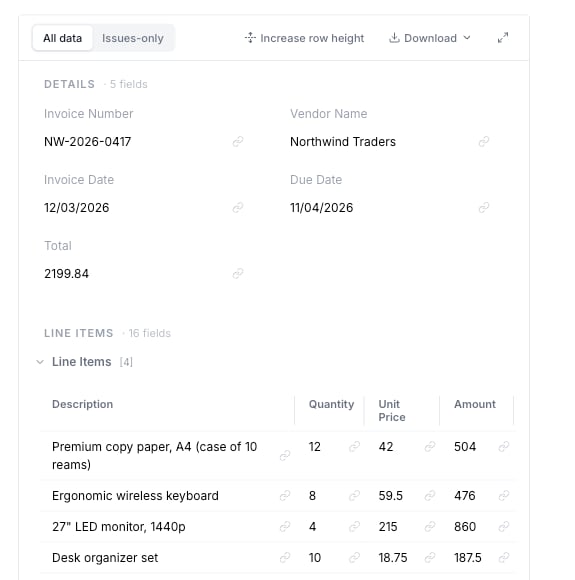
A Data Extraction result: structured fields (invoice number, vendor, dates, total) plus a line-items table you can review and download.
What files can be used
Agents can work with common business files, including:- PDFs
- Images
- Word documents
- Excel spreadsheets
- CSV files
- PowerPoint files
- Text and Markdown files
How extraction works
1
Add the document
Upload a file or let the agent receive it from email, a folder, or another connected app.
2
Tell the agent what to find
List the fields you need, such as invoice number, vendor name, due date, total, and line items.
3
Review the result
The agent returns the data in a table or structured result. When available, it also shows where the value was found in the document.
4
Send the data where it belongs
The agent can add the data to a spreadsheet, create a file, update a business system, or return it to the user.
Define the fields you need
Be specific about the fields the agent should extract. Good examples:- “Extract invoice number, vendor name, invoice date, due date, subtotal, tax, total, and currency.”
- “Extract each line item with description, quantity, unit price, and line total.”
- “If a purchase order number is missing, mark it as missing and ask the user.”
Use source checks
For many documents, the agent can show where a value came from in the original file. This helps reviewers quickly answer:- Did the agent read the right value?
- Is the value missing from the document?
- Did the agent confuse two similar fields?
Add quality rules
Rules help the agent catch common problems. Examples:- “The invoice total must equal subtotal plus tax.”
- “The due date must be after the invoice date.”
- “Every line item must have a quantity and unit price.”
- “Ask for review if the total is above $10,000.”